INTEGRATED BILLING

Your billing directly in HubSpot

QuickBooks is an accounting and billing software that is easy to install, simple to use, and integrates perfectly with HubSpot.

Connect QuickBooks with HubSpot, and boost your sales teams' performance by eliminating friction points in your business processes.

integration hubspot quickbooks

The benefits of QuickBooks x HubSpot integration

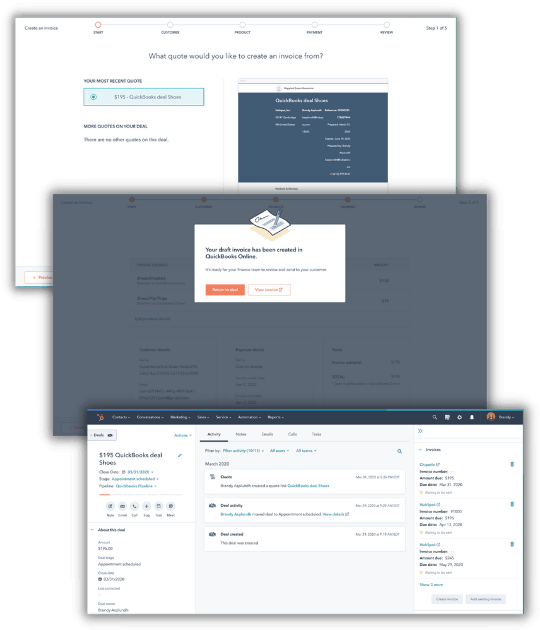
  • Quickly generate QuickBooks invoices from your HubSpot quotes
  • Automatically import your QuickBooks invoices into HubSpot
  • Boost your commercial performance by reducing friction points in your sales process
  • Optimize your customer experience by centralizing all your contact data in HubSpot
  • Strengthen your team collaboration by bringing together billing, accounting and sales teams on HubSpot
  • Automate your processes with HubSpot workflows triggered by your QuickBooks invoice information
  • Keep your inventory up to date by synchronizing your stock
  • Facilitate business management by generating HubSpot reports on your QuickBooks billing data
integration-hubspot-quickbooks-exemples

They trust QuickBooks

QuickBooks is the most installed billing solution on the HubSpot marketplace.
More than 5500 companies have already installed the QuickBooks and HubSpot integration!

avis-quickbooks-capterra
avis-quickbooks-appvizer
avis-quickbooks-independant
CONFIGURATION

How to configure the QuickBooks integration in HubSpot?


PREREQUISITES

Prerequisites for integrating QuickBooks with HubSpot

Before you start installing the integration itself, make sure you have administrator rights on both HubSpot and QuickBooks.

STEP 1

Step 1: Search for the integration in the marketplace

1. Click on the marketplace icon in your HubSpot interface.

2. Search for QuickBooks Online integration in the search bar.

3. Click on the first result.

STEP 2

Step 2: Install the QuickBooks app

Simply click on Install application, at the top right.

STEP 3

Step 3: Connect with your QuickBooks credentials

A new pop-up window will open, then enter your QuickBooks credentials to connect.

Once connected, the integration will be active and you will be able to find the QuickBooks application in the list of your connected applications.


Prerequisites for integrating QuickBooks with HubSpot

Before you start installing the integration itself, make sure you have administrator rights on both HubSpot and QuickBooks.

Step 1: Search for the integration in the marketplace

1. Click on the marketplace icon in your HubSpot interface.

2. Search for QuickBooks Online integration in the search bar.

3. Click on the first result.

Step 2: Install the QuickBooks app

Simply click on Install application, at the top right.

Step 3: Connect with your QuickBooks credentials

A new pop-up window will open, then enter your QuickBooks credentials to connect.

Once connected, the integration will be active and you will be able to find the QuickBooks application in the list of your connected applications.

WHAT'S NEXT?

How to maximize your investment return and exploit the integration to its full potential?

It's a major advantage of using QuickBooks integration in HubSpot: its configuration is simple and can be done in just a few minutes.
Nevertheless, connecting the two applications only represents the "tip of the iceberg".

icon_gear_rocket

The success of this type of configuration relies more on the essential strategic thinking:

  • Are your sales and billing teams' current processes the most efficient?
  • Do the new possibilities offered by the integration allow them to be optimized?
  • Which parts of your new processes can be automated?
  • What HubSpot workflows to automate your processes and improve your teams' productivity?
  • What technical and strategic impacts can this new integration have on your company?
  • How to ensure that all your teams use the new tools available efficiently?

All these questions require real reflection, and we therefore advise you to give them the necessary time to ensure the project's success.

WHY US?

Entrust your project to experts

team cercle
SVG_diamond-badge-color

HubSpot Diamond partner agency, Mi4 supports you on the following points:

  • Writing specifications to meet all your needs
  • Review and optimization of your sales and/or billing teams' processes
  • Complete and personalized configuration of the HubSpot / QuickBooks integration
  • Implementation of necessary workflows and adjustment of all concerned data
  • Training of your teams to facilitate solution adoption
  • Automation of your processes once validated, through specific workflows enabled by the integration
  • Experience sharing / skills transfer

They recommend us


Contact a QuickBooks & HubSpot expert